Youth, Explore Adapted Physical Education in Your IEP or 504 Plan

Overview

  • Physical Education (PE) can be adapted (changed) in four main ways to support students with disabilities.
  • Federal and state law protects your rights to be taught PE. Adapted PE can be included in your Individualized Education Program (IEP). It can also be included in a Section 504 plan.
  • Adapted PE can be useful for post-high school transition plans.
  • Taking part in IEP and 504 meetings is important when looking at adapted physical education. It lets you share your needs, preferences, and goals. This helps create a physical education program that fits your abilities, supports your well-being, and creates a positive and inclusive environment. (Click on the links in the reference section to learn more about going to IEP and 504 meetings.)
  • Changes in WA State rules mean that more teachers will qualify to design and teach Adapted Physical Education. These rules are in effect as of May 1, 2024.
  • The Updated Guidance on Adapted Physical Education, from the Washington Office of Superintendent of Public Instruction (OSPI) quoted in this article gives more information about Adaptive PE and how it fits into special education in WA State. Download or read Updated Guidance on Adapted Physical Education.

Why is physical education important? How is it helpful to me, as an individual with a disability?

Classes can teach you to care for your body and learn physical, mental, and emotional skills that include:

  • Motor skills (training to use your muscles for certain things, such as swinging a baseball bat to hit a ball, or running very hard in a race)
  • Physical fitness (keeping healthy and strong by exercising your body)
  • Social-emotional skills, teamwork, social play skills
  • Skills for athletics like team sports like soccer or basketball or individual athletics like gymnastics or dance
  • Skills for recreation like biking, swimming, hiking, throwing frisbees, playing games with friends

How Adapted PE works:

Access or accessible means how easy it is to do, to get, or understand something.

There are four main areas where changing general PE curriculum (school courses) may help you access PE. Some of these changes will benefit ALL students using the general PE curriculum.

  • The physical space can be changed to work well for all students:
  • The size of the space and the number of other students can affect how accessible the PE class is for you.
  • Lighting, sound, and what you see can all affect your comfort in a class. Making thoughtful changes to these things can make a PE class more accessible.
  • Teaching: the teacher gathers information about individual students to make sure that they use teaching methods that are accessible to everyone. This might mean spoken instructions, movements, pictures, written words, showing how to do something, or videos.
  • Equipment: depending on your disability, you might need PE equipment to move more slowly, be bigger or smaller, easier to feel, be easier to see and other changes like those.
  • Rules: to make sure PE includes everyone, rules of the game may need to be added or taken away.

Examples of Adapted PE

The point of Adapted PE is to change the general PE curriculum so that it is accessible for you or any other student with a disability. The changes can be individualized, which means it is designed for one individual student with disability. Changes will depend on what your needs are and will be different from student to student. Here are some examples:

  • A third grader with autism spectrum disorder uses a play script on her communication device to invite other students to play tag with her.
  • A high-school senior with Down Syndrome is introduced to adult recreation choices in his community so he can continue building healthy habits after graduation.
  • A seventh grader with Cerebral Palsy attends general PE class. The Adapted PE teacher, general PE teacher, and the physical therapist work together to create an exercise plan to strengthen the student’s legs while using their walker.
  • Design a unified team for sport activities and competitions, so a high school student with disabilities can play in the same team with students without disabilities.
  • Adapted Physical Education teachers are trained to make changes to the general education PE curriculum to make it accessible to students with disabilities.

IEPs can include Adapted PE as a service

To get an Individualized Education Program (IEP) you need an evaluation. This process helps to decide if a student has a disability, if the disability has a significant impact on (really affects) learning, and if you need Specially Designed Instruction (SDI) and/or related services to access a Free Appropriate Public Education (FAPE). FAPE is the right of any student, ages 3-21, who is eligible for school-based services delivered through an IEP.

If a student’s access to PE affects learning and needs the school’s PE course to be individualized, Adapted PE can be given as an IEP service. IEP teams discuss how Specially Designed Instruction (SDI) is delivered for each individual student.

If you have Adapted PE in your IEP, there is a range of options for placement. You might be in a general PE class, with or without accommodations. Additional aids, services, and modifications may be added depending on what you need. Get more details in the Updated Guidance on Adapted Physical Education.

You can go to IEP and 504 meetings to let the team know what you want and need.  Beginning at age 14, you can participate in IEP and 504 meetings. You do not have to be invited by the school or your parents, but it’s a good idea to let your parents know you want to go, and to get ready before the meeting. When you are at these meetings, you can show other team members what is important to you about your learning, including Physical education. (Click on the links in the Resources section to learn more about going to IEP and 504 meetings.)

All of you on the team can work out a PE plan, which may include Adapted PE, and put it in your IEP. There are two articles in the References section at the end about going to your IEP meeting.

Post-High School Transition and Adapted PE

Physical education and/or Adapted PE can play a key role in your’ post-high school transition plans so you can be healthy and active in your adult life.

If you have Adapted PE in your IEP or 504 plan, you can work with your transition team to identify the sports and recreation activities, entertainments, and any after-school programs you enjoy or want to join. You can plan to continue favorite school PE activities out in the community and explore new options. The transition period is also an ideal time for you to create fitness plans or exercise routines to do independently. For this part of your transition planning, your PE/Adapted PE teacher can be invited to join the transition team, if they are not already a part of it.
Adapted PE teachers and physical and occupational therapists, if part of your IEP or 504 team, can work together on skills related to physical activities and recreation. Some examples might include using a locker room, showing ID or membership at a reception desk, registering for programs or classes, and care and proper use of your sports equipment at home.

Rules changed and removed some difficulties with getting Adapted PE

Until spring of 2024, Adapted PE was not accepted as a specialty that the state would endorse (add to the training listed on a teacher’s professional certificate). This caused a shortage of teachers who could design Adapted PE for students. It made it difficult for some students with disability in Washington State to get SDI in physical education.

As of May 1, 2024, qualifying[1] teachers in Washington State can be trained for and receive a specialty endorsement in Adapted Physical Education. The endorsement shows the teacher has specific skills and knowledge in both PE Learning Standards and special education competencies. As more teachers are taught this specialty, it will be easier to find teachers with Adapted PE training in Washington State.

The OSPI Updated Guidance says that in addition to teachers with an Adapted PE endorsement, SDI for physical education can be provided by “any other appropriately qualified special education endorsed teacher, or an “appropriately qualified Educational Staff Associate (ESA) such as an Occupational Therapist (OT) or a Physical Therapist (PT).”

Summary:

  • Physical Education (PE) is an important part of school. Students with disabilities have the right to be taught physical education.
  • Adapted PE is when the general PE school course (curriculum) is changed to accommodate (meet the needs) of an individual student with disability.
  • Adapted PE can be included in an Individualized Education Plan or a Section 504 plan.
  • If a student needs Adapted PE, it’s important to include someone on the IEP team who is qualified to design adapted PE, as well as the teacher or other school staff who will be teaching the student.
  • Only certain qualified education professionals can design and supervise other educators and school staff teaching Adapted PE. Changes in WA State rules in 2024 allow more education professionals to qualify in Adapted PE.

Resources:


[1] “Certificated teachers who hold any special education endorsement or a Health/Fitness endorsement are eligible to add the APE specialty endorsement to their certificate”  –OSPI Updated Guidance

Five Tips for a Smooth PCS

Planning ahead and staying organized can make a military move much smoother, especially for families with children who have special needs. These key strategies and ready-to-use tools can help reduce stress and support your child’s success at the next duty station.

Introduction

Military families are likely to switch schools more often than other families. This can require learning new rules and finding new resources. To help plan, here are five valuable tips for a smooth PCS (permanent change of station, which is the military language for “relocation”) with a special educational or medical needs child.

Tip 1: Organize your files.

Records are critical for planning and stability. Accessing records once you have left a duty station is far more complex than getting copies to take with you. Keeping track of your child’s records can make the transition to a new assignment far easier. With your child’s information and records organized and up to date, you can quickly find any new trends, needs, or program changes to consider when you PCS.

  • Save copies of evaluations, educational plans and programs, work samples, and behavior plans.
  • Monitor regression by comparing student work samples and grades before, during, and after your PCS.
  • Note what has worked to support your student through previous transitions and share these successes with the Individualized Family Service Plan (IFSP), Individualized Education Program (IEP), or Section 504 team.

If your student comes from a Department of Defense Education Activity (DoDEA) school, you may also have records and evaluations from a Student Support Team (SST) or Case Study Committee (CSC).

Tip 2: Know your resources.

When you are moving to a new place, it is important to know who can help you. Contact the School Liaison and Exceptional Family Member Program (EFMP) family service office as soon as possible. They have useful information about things that can support your child’s health, well-being, and quality of life, like assignment locations, schools, housing, and other essentials. In your new state, you can also reach out to the Family Voices program. They can help you apply for public benefits such as extra money (SSI) and healthcare (Medicaid). It is also good to know your child’s rights as a military student when switching schools between states. Learn about the protections under the Interstate Compact on Educational Opportunity for Military Children and use this Step-by-Step Checklist for resolving school issues with the Interstate Compact.

Download the Essential Contact Form
English | German Deutsch | French Français | Spanish Español | Tagalog

Tip 3: Keep open lines of communication.

Building strong communication links with your child’s teachers and other school officials can be critical. Remember to keep track of notes, emails, texts, and conversations. Always follow up on agreements with a note summarizing what was agreed to and any timelines. Building a solid relationship with your child’s teachers will help you address potential difficulties while they are minor issues and build trust among all team members. Discuss all the efforts that are helping your child. Keep communication lines open by responding promptly and respectfully, and reach out to school staff with positive feedback, as well as for problem-solving concerns.

Tip 4: Ask questions.

The Individualized Family Service Plan (IFSP) and Individualized Education Program (IEP), or Section 504 Accommodations Plan, are the heart of how your child will receive services, accommodations, and modifications tailored to their unique needs. Never feel that you shouldn’t ask questions. Terms can change from place to place, but what the service includes will follow strict guidelines set up through the Individuals with Disabilities Education Act (IDEA) and the Americans with Disabilities Act (ADA). Since you will be the single consistent factor in your child’s educational career, the more you know, the better you can collaborate and plan within the IEP or 504 teams. Locate and contact the Parent Training and Information (PTI) center in your new state to assist you in navigating this process. Students and families in Washington State may contact PAVE for one-on-one support, information, and training through our Get Help request form.

Tip 5: Include your student.

All people need the ability to understand and communicate their needs and wants. The ultimate goal for our children is to help them become self-advocates to the best extent they are capable and comfortable. Providing them with tools early and on an ongoing basis will help them plan for their future. In the long run, it will help them to be the driver of services they need and want.

It’s PCS Time! Social Story

This original social story, “It’s PCS Time!”, is made to help military kids understand and handle the feelings that come with moving. A PCS can be confusing and emotional for children who might not know why they have to leave their home, friends, and routines. This story uses simple words and pictures to explain what happens during a move, helping kids feel more ready and less worried. Parents can read this story with their child to talk about the move, help them feel understood, and make the change feel a little less scary. Reading it before, during, and after the move can help kids feel more comfortable in their new home.

Download It’s PCS Time! Social Story:
English | German Deutsch | French Français | Spanish Español | Tagalog

Learn More

These are just a few tips on navigating the special education and medical systems when PCS’ing. If you want to learn more, visit our event calendar for upcoming trainings and register today. The Events page lists upcoming opportunities to learn on-demand (recorded), online learning, and with peers. You can choose from a range of topics and select what’s best for you – self-paced, peer-to-peer, in-person, or virtual learning.  These events cover topics like special education, advocacy, disability rights, and family support. It’s a place to stay connected, learn new skills, engage with others in the disability community, and share your wisdom with others.

Are you looking for something more personalized and at your pace? Check out our on demand Learning Library!

Families and Youth Have a Voice on Mental Health Matters Through FYSPRT

A Brief Overview

  • FYSPRT (pronounced fiss-burt) is a hard acronym to learn, but it’s worth the effort for families and young people who want to talk about improving mental healthcare systems around the state.
  • Here’s what FYSPRT means: Family members, Youth and System Partners (professionals) get together at a “Round Table” (meaning everyone has an equal voice) to talk about issues related to emotional distress, mental illness and/or substance-use disorder. All participants share ideas about what helps and what could make things better.
  • The Washington State Health Care Authority (HCA) provides a map of the 10 FYSPRT regions and includes contact information for local leaders and a schedule of where/when meetings are held.
  • FYSPRT began after a class-action lawsuit against the state, TR v Dreyfus. The litigation resulted in development of the state’s out-patient mental-health services program for youth—Wraparound with Intensive Services (WISe).
  • FYSPRT is a place where families provide feedback about WISe, but all community members are welcome—regardless of age or agency affiliation.
  • Some regional FYSPRTs sponsor separate meetings and social events for youth.

Full Article

Parents and young people who struggle with emotional distress, mental illness and/or substance-use disorder can feel powerless to affect change in a complicated medical system. The Family, Youth and System Partner Round Table (FYSPRT) provides a meeting space for family members and professionals to talk about what’s working and what isn’t working in the state’s mental health systems. The groups also provide informal networking and can provide ways for families to meet up and support one another under challenging circumstances.

The state sponsors 10 FYSPRT groups to serve every county: A list of the groups and which counties they serve is included at the end of this article. Each group reports to a statewide FYSPRT, which provides information to state government to influence policy. The Washington State Health Care Authority (HCA) provides a map of the FYSPRT regions and includes contact information for local leaders and a schedule of where/when meetings are held.

FYSPRT began as part of a class-action lawsuit against the state, referred to as TR v Dreyfus. The litigation began in 2009, and settlements were mediated in 2012-13. The federal court found that Washington wasn’t providing adequate mental health services to youth and required that the state start delivering intensive community-based mental health treatment. The state responded by developing the Wraparound with Intensive Services (WISe) program for youth under 21 who are eligible for Medicaid. WISe teams provide a wide range of therapies and supports with a goal to keep the young person out of the hospital, which costs more and can be traumatizing.

Young people under 18 who need residential care are referred to the Children’s Long-Term Inpatient program: PAVE’s website provides an article about CLIP.

To provide accountability for the delivery of WISe services, the state created FYSPRT as a forum for families to provide feedback about how the program is working. The mission is to provide an equal platform for everyone within the community to strengthen resources and create new approaches to address behavioral needs of children and youth.

FYSPRT provides a space where youth impacted by behavioral health issues and their family members can share ideas about what works well and what would work better. The FYSPRT model is based on the belief that everyone’s unique perspective is equally important, and everyone is invited. FYSPRT meetings are open to all interested community members. Each community has unique participants depending on what agencies work in the cities and towns within the region.

In order to create an atmosphere of equality, the FYSPRTs are led by a combination of youth, family members, and systems partners.  While a healthcare organization often works as the convener, the leadership is split between the Tri-Leads, who are elected from their membership. These include Youth Tri-Leads, Family Tri-Leads, and System Partner Tri-Leads. For many parents and youth, FYSPRT becomes a place to bond and connect to support one another. Some regional FYSPRTs include separate meetings for youth, and those groups can become a key social outlet.

Staff who serve families through WISe are key participants. Other attendees are case managers from the state’s Medicaid-provider agencies, behavioral health counselors, foster-care workers, staff of homeless programs and staff and volunteers from affiliates of the National Alliance on Mental Illness (NAMI). Other participants are leaders of support groups for youth in recovery or working with issues related to gender identity or sexuality. PAVE staff are regular attendees in many regions.

Every area of the state of Washington has its own FYSPRT, overseen by the Health Care Authority.  Each of the ten FYSPRT regions is comprised of a single county or up to eight adjoining counties. In order to create greater participation from the general public, transportation and childcare stipends are available for families and youth in most areas. Some groups provide free meals for everyone and/or gift card incentives for the families and young people who attend. Family and Youth who act as leaders (Tri-Leads) along with system partners are paid for their participation.

Here are links to each regional FYSPRT’s website and a list of the counties each represents:

System of Care Partnership – Mason, Thurston

Great Rivers Regional FYSPRT – Cowlitz, Grays Harbor, Lewis, Pacific

HI-FYVE – Pierce

King County Community Collaborative (KC3) – King

North Central Washington FYSPRT – Chelan, Douglas, Grant, Okanogan

North Sound Youth and Family Coalition – Island, San Juan, Snohomish, Skagit, Whatcom

Northeast FYSPRT – Adams, Ferry, Lincoln, Pend Oreille, Spokane, Stevens

Salish FYSPRT – Clallam, Jefferson, Kitsap

Southeast FYSPRT – Asotin, Benton, Columbia, Franklin, Garfield, Kittitas, Whitman, Yakima

Southwest FYSPRT – Clark, Klickitat, Skamania

Defining your Social Media Game Plan: #Goals

Thinking about how you use social media and screens can help you make better choices for your mind, body, and relationships. When you take time to notice how you feel, what you see, and how much time you spend online, you can stay in control instead of letting screens take over. Talking with trusted adults and setting goals for your screen time can help you stay safe, feel better, and enjoy the good parts of being online. 

Think about Yourself

Your social media accounts are all about you! Think about why you are using social media or other screens. Is your goal to talk to friends, find cool videos, or learn something new? Thinking about your goals and what you like helps you control how you use social media, instead of letting it control you. To better understand your goals, ask yourself:

  • What is your goal when you open an app or go online?
  • Did you reach your goal, so you can set it down now?
  • Are you in control of how you use it, or does it feel like it controls you?

Think about What You See

Consider what you see and read online. What purpose does this have for you? Is it something helpful and interesting, or is it making you feel bad? Sometimes you might see things that are mean or make you feel sad, anxious, or even angry. If you notice that what you’re seeing online is often upsetting or distracting you from important things, maybe it’s time to look for content that helps you feel better. You can control some of what you see online by only following pages that make you feel good, and by unfollowing or muting accounts that post things that upset you or make you feel bad about yourself.

Think about what you see online and ask yourself:

  • What kinds of things do you usually look at online?
  • What purpose does this content have for you?
  • If some content makes you feel bad, are there other things you could look at online that might help you feel better or learn something new?

Think about How You Feel

Think about how you feel and how you use screens when you’re feeling strong emotions. Sometimes we use phones or games to escape negative feelings, but there are other ways to calm down, like talking to people you trust, taking a walk, or making art.

When thinking about how social media makes you feel, ask yourself:

  • How does using social media make you feel?
  • Does what you see online make you feel good?
  • When you’re feeling sad, bored, or stressed, do you often use screens or social media to feel better?
  • Are there other ways you can help yourself feel calm that don’t involve a screen?

Think about What Screens Get In The Way Of

Screens shouldn’t stop you from doing homework, seeing friends in person, getting enough sleep, or doing other things. Think about how long you are going to use an app or website and set a clear time limit for yourself. That way, you can reach that time and be able to put your phone down because you planned to stop. To help you set a time limit that works for you, ask yourself:

  • How long are you planning to use social media or a screen right now?
  • Did you set a clear time to stop using it?
  • Does using screens stop you from doing other important things, like homework, spending time with family or friends in person, or getting enough sleep?

Think about Relationships

You can talk with a friend or trusted adult about your online life and how you are feeling about it. By sharing about how you feel about friends online and in real life, you can better understand what purpose connecting online has for you. Talking helps you learn how to use screens safely.

When you think about your friends and family, ask yourself:

  • Do you feel comfortable talking to a parent or trusted adult about your online life?
  • If something online made you feel uncomfortable or upset, would you feel okay talking to someone about it?
  • How do you feel about your friendships online compared to your friendships in real life?
  • What purpose does connecting online have for you in your friendships?

Remember, social media should be something that adds to your life—not something that takes away from it.


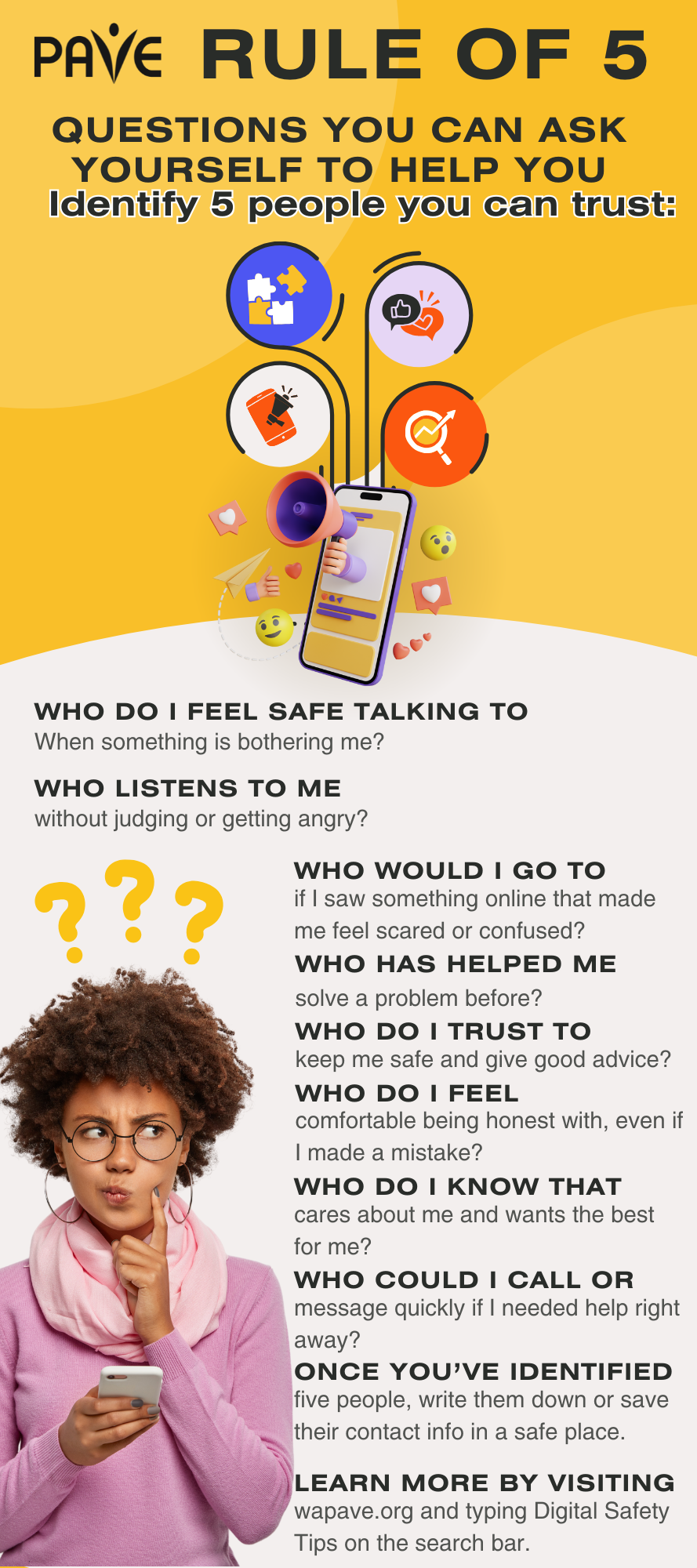
Identify Your Five

One way to stay safe online is by using the “Rule of 5,” which means having five trusted people you can talk to when something online feels wrong or confusing. These questions can help you identify five people you can trust:

  • Who do I feel safe talking to when something is bothering me?
  • Who listens to me without judging or getting angry?
  • Who has helped me solve a problem before?
  • Who would I go to if I saw something online that made me feel scared or confused?
  • Who do I trust to keep me safe and give good advice?
  • Who do I feel comfortable being honest with, even if I made a mistake?
  • Who do I know that cares about me and wants the best for me?
  • Who could I call or message quickly if I needed help right away?

Once you’ve identified five people, write them down or save their contact info in a safe place.

Final Thoughts

Taking control of your social media use starts with understanding your goals, feelings, and habits. By reflecting on how, why, and when you use screens, you can make choices that support your well-being and help you stay safe online. Whether you’re setting time limits, curating your feed, or reaching out to trusted people, every small step counts. Keep checking in with yourself, stay curious, and remember—you have the power to shape your digital world in a way that works for you.

Learn More

This self-reflection guide was developed as a practical tool to help implement the strategies outlined in Level Up Your Social Media Game: Digital Safety Tips for Youth and Young Adults with Disabilities.  It is designed to encourage thoughtful engagement with the digital safety concepts presented in that article, supporting users in applying them to their own online experiences.

Family caregivers and professionals can learn how to support kids’ health and emotional well-being by helping them use social media safely. A great place to start is the American Academy of Pediatrics’ “5 Cs of Media Use” guides.

Level Up Your Social Media Game: Digital Safety Tips for Youth and Young Adults with Disabilities

Social media has both benefits and disadvantages. To use social media safely and effectively, it’s important to practice digital safety and self-awareness. This guide teaches tips and tools to help you make smart choices and stay in control online.

Brief Overview

  • Social media helps people with disabilities connect, express themselves, and find support—but it also comes with risks that users need to understand.
  • A trusted adult is someone you know in real life who cares about your safety and can help you make good choices.
  • Not everyone online is who they say they are.
  • People may act mean online or post things just to get attention.
  • Be careful what you share and talk to someone you trust if something feels wrong.
  • Anything you post online can be copied and shared. Think before you post, especially if someone is pressuring you to share something quickly.
  • Not everything online is true. Learn how to check facts and find trusted websites so you can tell what’s real and what’s not.
  • Asking for help is smart and keeps you safe.

Introduction

Social media is everywhere and isn’t going away. For people with disabilities, it opens up new ways to connect, communicate, and participate in conversations that might otherwise be difficult.  It can help you feel included and connected. It can be a powerful tool for inclusion and accessibility.

However, while social media offers many good things, it also comes with risks that everyone, especially youth and young adults, need to know about.

Knowing Who to Trust

One of the most important ways to stay safe is by knowing who you can trust, especially when talking to people online. Not everyone you meet online is the same as the people you know in real life. A trusted adult is someone you know in real life who truly cares about your safety and wants to help you make good choices. This could be a parent, teacher, school counselor, coach, or another grown-up you feel safe talking to. They listen to you, respect your feelings, and are there to help you when something is wrong. They are someone you can count on in real life. This is very different from a social media “friend” or “follower” who might be someone you’ve never met in person. Just because someone is nice to you online doesn’t mean they are safe or honest. People online might pretend to be someone they are not, like acting like they are your age to try and gain your trust. This can be part of a trick to try and get your personal information or pictures. Remember, a trusted adult is someone you can rely on for help and safety in the real world, not just someone who sends you messages online.

The Evolving Purpose of Social Media

Social media began as a way for people to connect, talk, and share things with each other. It can be a fun place where kids connect with friends, explore their interests, and learn new things. It can also help kids feel supported and included, especially those with disabilities.

Social media apps and websites are free to use, which makes them easy for lots of people to join. Even though you don’t pay money to use them, social media companies still make money—by showing you ads. The longer you stay on the app, the more ads you see, and that helps the company earn more. In other words, the social media companies are making money from your time and attention. That’s why it’s important to remember that you’re in control of how much time you spend online. When you use social media in a smart way, it can be fun and helpful—just make sure it’s working for you, not the other way around.

Social Media Risks and How to Stay Safe Online

But social media isn’t always safe. Some people feel like they can say mean things online because they think no one will find out who they are. Since they can’t see your face or how you feel, they might not realize how much they’re hurting you—and that makes them less likely to stop. Also, when kids see others being mean online, they might think it’s okay to join in. And sometimes, trying to get likes, shares, or views can lead kids to post things that hurt someone else, even if they didn’t mean to. That’s why it’s important to learn about these risks and talk with friends and family about how to stay safe and kind online.

Cyberbullying

Cyberbullying is when people are mean to you online by sending hurtful messages or making unkind posts. Sharing or forwarding mean content that someone else wrote can is also a form of cyberbullying. Studies show that youth with disabilities are more likely than other kids their age to be cyberbullied.

If someone is being mean to you online, you don’t have to handle it by yourself. Talk to an adult you trust, like a parent, teacher, or school counselor. They can help you figure out what to do next. STOP.THINK.CONNECT, a website that specializes in online safety and cybersecurity awareness, says it’s usually best not to talk back to the bully. Instead, save a screenshot or copy of what they said and show it to your trusted adult. That way, they can better understand how to help you. You should also learn how to block or report the person on the app or website you’re using. Most sites have tools to help you stay safe.

Social Engineering and Trickery

Sometimes, people use social media to trick others into giving away personal information—this is called social engineering. It can happen when someone pretends to be your friend, asks you to click a link, or says something that makes you feel scared or rushed. They might try to get your passwords, address, or other private details. This can be especially confusing if you have trouble telling when someone is being dishonest. That’s why it’s important to be careful about what you share online and to talk to a trusted adult if something doesn’t feel right or makes you uncomfortable.

You have the right to say “No” if someone—even someone you know—makes you feel uncomfortable online. It’s okay to stop talking to them or to question what they’re saying. If something doesn’t feel right, trust your instincts and talk to a friend or trusted adult. Some people online may pretend to be kids or teens when they are actually adults with harmful intentions. That’s why it’s important to be careful about who you talk to and what you share in conversations. You don’t have to handle anything alone—there are people who care about you and want to help.

Anything you share online or through your phone—pictures, posts, texts, comments, everything!—can be copied and shared. Once you post or send something, it might be used in ways you didn’t expect or want. Before you share anything, ask yourself if it includes private information or something you wouldn’t want everyone to see. If someone is pressuring you to send something quickly, that’s a red flag. Take a moment to think, and don’t let anyone rush you. Talk to a trusted adult if you’re unsure. Being smart about what you post helps protect your privacy and keeps you safe.

Harmful Content

Social media can sometimes show things that make people feel bad, unsafe, or want to do things that aren’t healthy. This is called harmful content. You might see pictures or videos that make you feel bad about your body or tell you to do unhealthy things, like not eating enough. This kind of content can hurt your self-esteem and mental health. Many of the photos and videos online are edited or only show the best parts of someone’s life, not the full picture. These unrealistic expectations can make people feel like they have to be perfect all the time, which isn’t fair or healthy. Everyone has good days and bad days, but social media often hides the hard parts.

To protect yourself, remember that it’s okay to be yourself and that nobody is perfect. Try to follow people who are honest and positive, and take breaks from social media when you need to. If something online makes you feel bad, talk to a friend or trusted adult.

Privacy

When you share personal information online—like your full name, address, phone number, or passwords—it can be used in ways you don’t expect. That’s why it’s important to protect your privacy by being careful about what you share and who can see it. Some companies collect your data to show you ads or sell your information, and strangers online might try to trick you into giving away private details. To protect yourself, don’t share private details online, especially with people you don’t know.

When playing games or talking with people you don’t know online, you can use game names and avatars to protect your privacy. Often, online game websites and apps will help you to create a random name that doesn’t require any personal information.

Use strong passwords and keep them secret. You can also check your privacy settings on apps to control who sees your posts.  The National Cybersecurity Alliance (StaySafeOnline.org) provides a list of links to the official privacy settings pages for popular websites and mobile apps, including major social media sites, and a guide to creating and using strong passwords.

Misinformation and Digital Literacy

Not everything you see online is true. Sometimes, people post things that are made up or not based on real facts. This is called misinformation. It can spread quickly on social media because the internet often cares more about what gets attention than what is true. It’s important to check if something is true before you believe it or share it. You can do this by looking it up on trusted websites or asking an adult to help you. 

Learning how to tell the difference between real and fake information online is called digital literacy, and it helps you stay smart and safe online. A big part of being digitally literate is knowing where to find information you can trust. Websites from certain places are often trusted sources. These kinds of websites are generally considered places that share reliable facts and safety tips backed by research:

  • Websites that end with .gov usually belong to the U.S. government, like places that share safety tips or resources.
  • Websites ending with .ed or .edu are often connected to educational organizations or government education departments.
  • Websites ending with .mil are for the U.S. military.

Looking for these endings can be a helpful way to find information you can trust. It’s a good idea to stay current and check trusted websites for the latest information.

Scams

 Scams are tricks people use to try to steal your money or personal information. Scammers might pretend to be someone you know, like a friend or family member, or even act like they’re from your bank or a company you trust. They might send you messages asking for your password, bank info, or to send them money.

If something feels weird or too good to be true, it probably is. One way to stay safe is to check with a trusted adult that you know in person—before you respond.

Rule of Five

One way to stay safe online is by using the “Rule of 5,” which means having five trusted people you can talk to when something online feels wrong or confusing. These people could be parents, teachers, counselors, or other adults who care about you and want to help. If you get a message or see something that makes you feel uncomfortable, it’s always okay to stop and check with one of your five trusted people before you respond. Even if you feel embarrassed or worried, asking for help is the smart thing to do. Your safety matters more than keeping a secret or being afraid of losing your phone. Trusted adults are there to support you, not to get you in trouble.

Here are some questions you can ask yourself to help you identify five people you can trust:

  • Who do I feel safe talking to when something is bothering me?
  • Who listens to me without judging or getting angry?
  • Who has helped me solve a problem before?
  • Who would I go to if I saw something online that made me feel scared or confused?
  • Who do I trust to keep me safe and give good advice?
  • Who do I feel comfortable being honest with, even if I made a mistake?
  • Who do I know that cares about me and wants the best for me?
  • Who could I call or message quickly if I needed help right away?

Once you’ve identified five people, write them down or save their contact info in a safe place.

Helpful infographic on how to find out the 5 people you trust

Final Thoughts

Social media is a tool, and like all tools there are right ways and wrong ways of using it. Social media should help you—not control you. When you know how to stay safe, set limits, and ask for help when something feels wrong, you can enjoy the fun parts of being online. Always try to be kind and respectful, just like you would be in person. With the right tools and support, you can find ways to make social media work for you, not the other way around.

Learn More

Check out the related article, Defining your Social Media Game Plan: #Goals, for self-reflection questions to help children, youth, and young adults identify their goals for social media.

Attention Students: Lead your own IEP meetings and take charge of your future

If you are a student with an Individualized Education Program (IEP), read this article to find out how you can be a leader on your IEP team. Your future is counting on you!

A Brief Overview

  • By the time you are 16 years old, the school is required to invite you to your IEP meetings. You can attend any time, and leading your own meeting is a great way to learn important skills.
  • The part of the IEP that focuses on your adult goals is called a Transition Plan, and it is all about you and your future.
  • If you need more help at school or aren’t learning what you need to learn, then your IEP might need some fixing. Your voice matters on the IEP team.
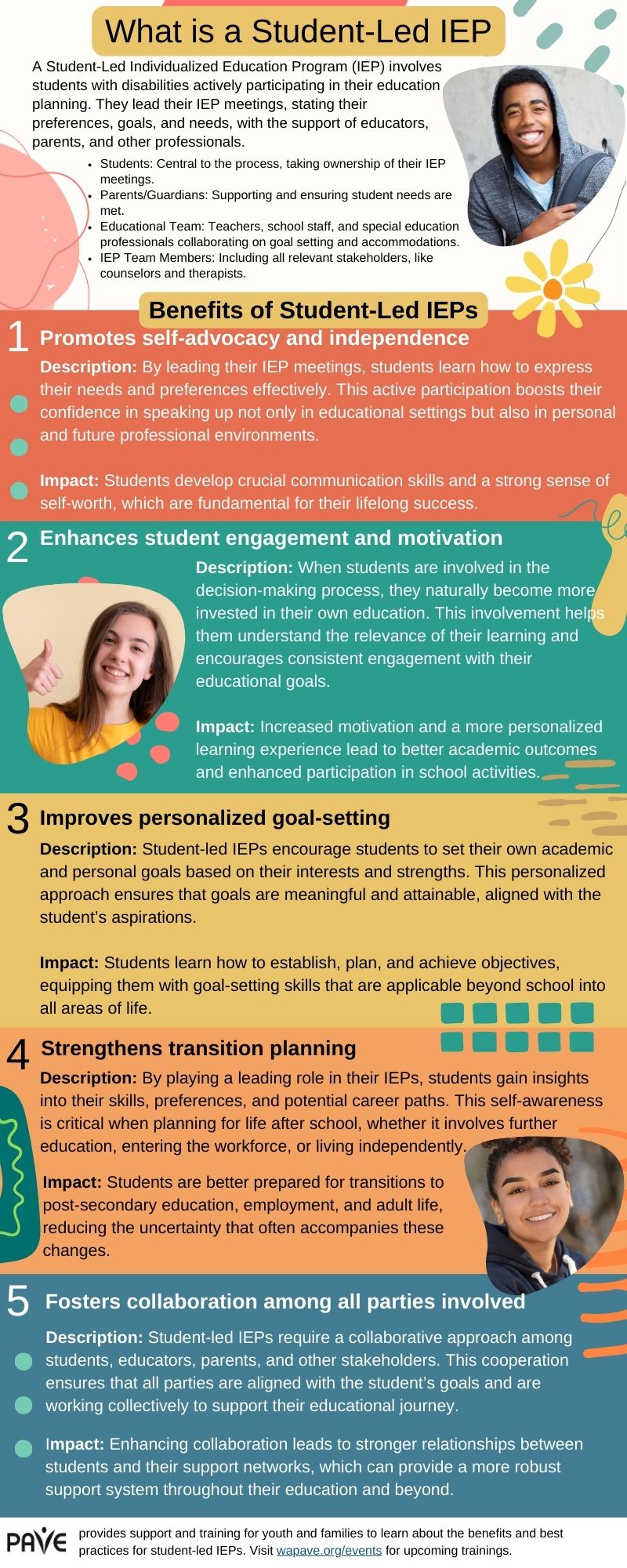
  • PAVE provides an infographic overview of Student-Led IEPs, available for download in multiple languages at the bottom of this article..

Introduction

It’s important to plan your time carefully so that every school day gets you closer to where you want to be when you are an adult. 

Learn to be a self-advocate

 An advocate (pronounced ad-vo-cut) is someone who asks for something in a public way. Public schools get money from the government, so they are considered public entities. When you ask the school to provide you with something that you need to succeed, then you are being a self-advocate.

The word advocate can also be an action word (a verb), but then it’s pronounced ad-vo-cate (rhymes with “date”). You advocate for yourself when you ask for what you need to succeed.

Here’s another way to use this hyphenated word: You can say that you “practice self-advocacy.” Leading your own IEP meeting is a great way to practice self-advocacy and develop important adult skills.

Your Transition Plan focuses on where you want to go

 The part of the IEP that focuses on your adult goals is called a Transition Plan. The Transition Plan is added to the IEP by the school year when you turn 16. The plan includes details about:

  • when you plan to graduate (you can stay in school until your 22nd birthday if your IEP goals require more time)
  • what jobs you might choose
  • whether college is part of your plans
  • what lifestyle you imagine for yourself (will you drive, cook, shop, live alone?)
  • how school is getting you ready for all of that

The Transition Plan is all about you and your future. You can start taking charge of your future by going to your IEP meetings. You may want to lead all or part of the meeting, and you have that right.

By the time you are 16 years old, the school is required to invite you to your IEP meetings. From that year on, your school program is matched to your long-term goals.

The law says it’s all about you

Your rights as a student with an IEP are part of a federal law called the Individuals with Disabilities Education Act (IDEA). The IDEA says that schools must include family members and students on the IEP team. If you don’t play on the team, you can’t win the game, right? This is more important than a game—it’s Your Life!

The IDEA is a unique law because it says you get what you need in order to access school and learning. Getting an education that is specially designed just for you is called an entitlement. What you are entitled to is called FAPE, which means Free Appropriate Public Education.

You can become a leader on your IEP team by learning more about FAPE and how to talk about what it means to you. Public education is free for all school-age students in the United States, but consider this question: What makes your education appropriate?

Here are some questions to help you think and talk about FAPE:

  • What is it like to have a disability?
  • What about your disability makes school hard?
  • What do you need at school that helps you learn?
  • Are you getting better and better at the skills you need to be good at?
  • Are your teachers helping you see what you do well?

If you are learning important skills at school, and your learning is helping you build on your strengths, then you are probably getting FAPE. If you need more help or aren’t learning the skills that you need to move forward, then your IEP might need some fixing. Keep in mind that the school is responsible to provide you with FAPE. You have the right to ask for FAPE.

Learn what your IEP can do for you

Here’s a starter kit to help you understand what your IEP says and how you can ask for changes. When you go to your IEP meeting, you have the right to ask the teachers and school administrators to help you read and understand your IEP.

These are some important parts of an IEP:

  • Category of Disability: This is on the “cover page” of the IEP document. It lists the type of disability that best describes why you need individualized help at school. You should know this category so you can understand how and why teachers are supposed to help you.
  • The Present Levels of Performance: This is the long section at the beginning of the IEP that describes how you are doing and what the school is helping you work on. The beginning of this section lists what you are good at. Make sure that section is complete so you can be sure the teachers help you build on your strengths.
  • Goals: When you qualified for an IEP, the school did an evaluation. You showed that you needed to learn certain things with instructions designed just for you. To help you learn, the teachers provide Specially Designed Instruction. They keep track of your progress toward specific goals in each area of learning. You can learn what your goals are and help track your progress. The I’m Determined.org website provides videos of students describing their goals and other downloadable tools, like worksheets to help you track your goals.
  • Accommodations: You can ask for what you need to help you learn in all the different classrooms and places where you spend the school day. Do you learn better if you sit in a specific part of the classroom, for example, or if you have a certain type of chair? Do you need to be able to take breaks? Do you do better on tests if you take them in a small, quiet space instead of the regular classroom? Do you need shorter assignments, so you don’t get overwhelmed? Helping your teachers know how to help you is part of your job as an IEP team member.

Get Ready for Your IEP Meeting

You can get ready for your IEP meeting by looking over the IEP document.  You may want to ask a family member or a teacher to help you read through the document. If you don’t understand what’s in your IEP, plan to ask questions at the meeting.

PAVE provides a worksheet to help you prepare for your meeting. It’s called a Student Input Form. You can use this worksheet to make a handout for the meeting or just to start thinking about things you might want to say. If you don’t want to make a handout, you might draw pictures or make a video to share your ideas.

These sentence starters might help you begin:

  • I enjoy…
  • I learn best when…
  • I’m good at…
  • It’s hard for me when…
  • I want more help in these areas…
  • I like school the most when …
  • Teachers are helpful when they…
  • I want to learn more about …
  • It would be great if…

You may want to think about your disability and how it affects your schoolwork. You could work on a sentence or draw a picture to help the teachers understand something that is hard for you. These might be the parts of a sentence that you can personalize:

  • My disability in the area of …
  • makes school difficult because…

Your handout can include a list of what you want to talk about at the meeting. Here are a few ideas, but your options are unlimited:

  • A favorite class, teacher or subject in school?
  • A time during the school day that is hard for you?
  • Your IEP goals?
  • Something that helps you feel comfortable and do well?
  • Something you want to change in your school schedule or program?
  • Graduation requirements and when you plan to graduate?
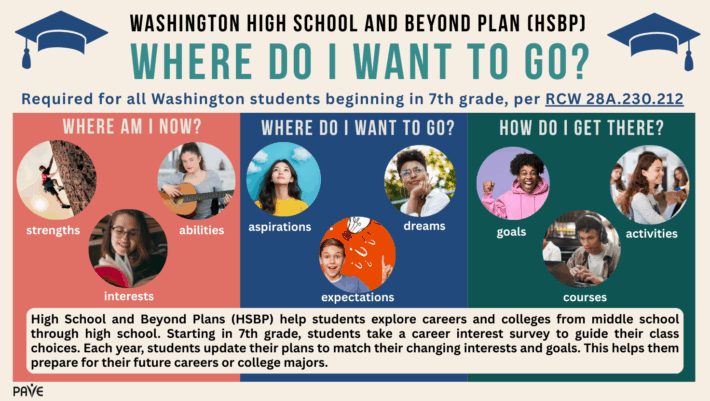
  • Your High School and Beyond Plan?
  • Anything else that’s important to you?

It’s never too soon to plan ahead!

Setting goals and making some plans now will help your school and family help you make sure you’ve got the right class credits, skills training and support to make that shift out of high school easier.

Being a leader at your IEP meeting is a great way to build skills for self-advocacy and self-determination, which is another great two-part word to learn. Self-determination means you make choices to take control of your life. At your IEP meeting, you can practice describing what helps you or what makes your life hard. You get to talk about what you do well and any projects or ideas that you get excited about. In short, you get to design your education so that it supports your plans to design your own adult life.

Learn More

Benefits to Student led IEP's

Bullying at School: Resources and the Rights of Students with Special Needs

Students with disabilities who are bullied at school have legal protections, and schools have added responsibilities to ensure their safety and well-being. When acts of bullying involve discrimination based on disability, race, sex, or religion, federal agencies classify those acts as harassment.

A Brief Overview

  • OCR provides a fact sheet for parents about school legal obligations to address bullying. The fact sheet is available in Spanish.
  • According to OCR, students who are victims of bullying shall not be further victimized by the school’s response: “Any remedy should not burden the student who has been bullied.”
  • Families can ask the school for a form to file a “HIB Complaint.” HIB stands for Harassment, Intimidation, and Bullying.
  • OCR investigates complaints of disability discrimination at schools. OCR’s Complaint Assessment System provides a place to choose a language before filing a complaint. Contact OCR at 800-421-3481 (TDD: 800-877-8339).
  • Bullying protections apply to all students with disabilities, regardless of whether they are served through an Individualized Education Program (IEP) or a Section 504 Plan.
  • Failure to stop bullies and support a victimized student with disabilities is considered a denial of the student’s right to a Free Appropriate Public Education (FAPE). The U.S. Department of Education provides a Dear Colleague letter with guidance about bullying as a FAPE violation.
  • Find additional guidance at StopBullying.gov, which offers suggestions for parents and what teens can do.

Full Article

The Office for Civil Rights (OCR) and the Department of Justice (DOJ) list the following as harassing behaviors:

  • Unwelcome conduct, such as verbal abuse, name calling, epithets, or slurs
  • Graphic or written statements
  • Threats
  • Physical assault
  • Other conduct that may be physically threatening, harmful, or humiliating

The PACER Center’s National Bullying Prevention Center, founded in 2006, provides this OCR and DOJ information and further explains that “bullying may also be considered harassment when the conduct is sufficiently serious that it interferes with (or limits) a student’s ability to participate in (or benefit from) the services, activities, or opportunities offered by a school, and it is based on a student’s disability.”

PACER Center provides letter templates to help parents write to the school and reminds families: “Data is important. Remember, if it is not in writing, it does not exist. Please be sure to keep a copy of the letter(s) for your records. These records can help parents keep a concise, accurate timeline of events. These sample letters are general in nature in order to serve all potential users.”

What does a school have to do when a child with a disability is bullied?

OCR provides a fact sheet for parents about school legal obligations to address bullying. The fact sheet is available in Spanish. Here are a school’s basic responsibilities:

  • Take immediate and appropriate action to investigate the issue and take necessary steps to stop the bullying and prevent it from recurring.
  • Interview targeted students, offending students, and witnesses, and maintain written documentation of the investigation.
  • Remedy the effects of bullying by further supporting a student with services through an Individualized Education Program (IEP) or Section 504 Plan.
  • Make sure the student who was bullied is helped and not further injured by actions taken in response. For example, the victim should not be suspended. According to OCR: “Any remedy should not burden the student who has been bullied.”

To learn more about student rights related to discipline, see PAVE’s article: What Parents Need to Know when Disability Impacts Behavior and Discipline at School.

What can a parent do?

Every school district has a process for filing a formal complaint related to harassment, intimidation and bullying (HIB). A parent or student can say, “I want to file a HIB complaint” and request the proper forms from the school.

Here are options for families:

  • Contact the HIB compliance officer in your school district.
  • Search online or request a HIB complaint form.
  • Request copies of the student handbook and the district’s written HIB policy.
  • If the act included a violation of the law, such as a physical assault, file a police report.
  • Request an emergency meeting of the IEP or Section 504 team to add supports for the student to ensure emotional and physical safety at school.
  • Ask the school district compliance officer for specific details—in writing—about who is responsible to stop the bullying, what will be done, and when. Ask how that officer will provide follow through and confirm accountability schoolwide. Write everything down.
  • Seek help from the Office for Civil Rights (OCR). The office investigates complaints of disability discrimination at schools. OCR’s Complaint Assessment System provides a place to choose your language before filing a complaint.
  • To learn more about federal civil rights laws or how to file a complaint, contact OCR at 800-421-3481 (TDD: 800-877-8339).

Rules in Washington State

The 2019 Legislature passed Substitute Senate Bill 5698, a Washington State law that prohibits harassment, intimidation, or bullying (HIB) in schools. The law requires school districts to have a formal HIB policy and a person designated to uphold the policy and distribute information among staff, students, and families.

The HIB Prevention and Intervention page of the Office of Superintendent of Public Instruction (OSPI) website includes guidance for students and families, including student safety plan templates and a sample HIB Incident Reporting Form available in multiple languages. There is also a link to the emails and/or phone numbers of HIB compliance officers in each school district, sample student safety plans. 

Washington State defines harassment, intimidation, or bullying (RCW 28A.300.285) as any intentional electronic, written, verbal, or physical act that:

  • Physically harms a student or damages the student’s property
  • Has the effect of substantially disrupting a student’s education
  • Is so severe, persistent, or pervasive that it creates an intimidating or threatening educational environment
  • Has the effect of substantially disrupting the orderly operation of the school

The Governor’s Office of the Education Ombuds (OEO) offers direct support to students and their families. OEO provides an online intake form and a phone option, with language interpretation available: 1-866-297-2597.

According to OEO, “Bullying and harassment can be a difficult topic for schools, families and students, but not talking about it can make it worse.” OEO provides information and tools to help families figure out who to talk to, how to raise informal and formal complaints, and how to help prevent and respond to bullying or harassment: “If you have questions, or want help understanding or addressing a concern, contact us.”

The state chapter of the American Civil Liberties Union (ACLU Washington) provides a downloadable guidebook on student rights. A section about harassment states: “Harassment is illegal when it is so severe, persistent, or pervasive that it creates an intimidating or hostile school environment and interferes with your education.”

How common is bullying of students with disabilities?

Data show that students with disabilities are bullied at least twice as frequently as their typical classmates. According to the PACER Center: “Although only ten U.S. studies have been conducted on the connection between bullying and developmental disabilities, all of these studies found that children with disabilities were two to three times more likely to be bullied than their nondisabled peers.”

According to Disability Scoop, about half of individuals with autism, intellectual disabilities, speech impairments and learning disabilities are bullied at school. The rate of bullying for typical students is about 10 percent.

Stopping stigma and ending discrimination require everyone to consider myths about bullying that often make things worse for a person who has been the victim of harassment, intimidation, or bullying. PACER Center’s National Bullying Prevention Center provides a document that describes myths about bullying.

For example, it’s never true that “some people deserve to be bullied.” Here’s a statement to dispel that myth: “No child’s behavior justifies being hurt or harmed in any manner. All children deserve to be treated with respect and consideration.”

It’s also never true that “bullying will make kids tougher.” In fact, “Bullying does not make someone tougher. Research has shown it often has the opposite effect and lowers a child’s sense of self-esteem and self-worth. Bullying often creates fear and increases anxiety for a child.”

Another myth is that telling a teacher about bullying is “tattling.” Adults can ensure that children understand the difference between tattling and telling: “Tattling is done to get someone in trouble. Telling is done to protect someone.” Keeping secrets about a bully gives the bully more power and hurts everyone.

Federal Guidance

The U.S. Department of Education maintains a website page with access to resources about student rights and anti-bullying protections. The department’s Office for Civil Rights (OCR) can accept complaints with overlapping civil rights concerns. For example, a complaint about bullying may also include aspects of racism and disability discrimination. OCR points out that bullying concerns that are not appropriately addressed can violate Section 504 of the Rehabilitation Act and Title II of the Americans with Disabilities Act (ADA):

“Under Section 504 and Title II, schools must address bullying and harassment that are based on a student’s disability and that interfere with or limit a student’s ability to participate in or benefit from the services, activities, or opportunities offered by a school. Further, if any bullying or harassing behavior interferes with the ability of a student with a disability to access educational services, the situation, if uncorrected, may constitute a FAPE violation. OCR works with other offices in the Department, as well as with the U.S. Department of Justice (DOJ), to address bullying and harassment of students with disabilities.”

Crisis Help

A child’s mental well-being may be impacted by bullying. If a student or family member needs someone to talk to in an emergent moment of crisis, these phone numbers may be helpful:

  • 988 Suicide & Crisis Lifeline
  • General Teen Talk line: 800-TLC-TEEN
  • Trevor Project (issues related to sexuality): 866-488-7386

Additional hotlines and text lines:  FindAHelpline.com

Where to Begin When A Student Needs Help

Diverse friends taking big group selfie shot smiling at camera -Laughing young people standing outdoor and having fun - Cheerful students portrait outside school

Where to Begin When A Student Needs Help

A toolkit to guide you through the special education process in Washington State


When a student has unmet needs and may need new or different school-based services, figuring out what to do next can feel confusing or overwhelming. PAVE provides this toolkit to support families in taking initial, critical steps. These guidelines apply regardless of where school happens.

Presenting our newest resource – the Where To Begin When a Student Needs Help.  This user-friendly toolkit has been created to give you and your family the guidance you need when you are navigating the special education process in Washington State.

A user – friendly toolkit for families, Each section is detailed below:

Where to Start Articles:


Planning my Path – A User-Friendly Toolkit for Young Adults

excited high school students with arms outstretched outdoors

Planning My Path

Practical Tips and Tools for Future Planning


Presenting our newest resource – the Planning My Path Practical Tips and Tools for Future Planning. This toolkit encompasses a collection of our informative articles, complemented by easy to understand timeline charts to provide you with a solid foundation as you navigate through this crucial transition period.

A user – friendly toolkit for young adults, Each section is detailed below:

Articles to help Young Adults:


Apple Health for Kids: Medicaid and Children’s Health Insurance Program (CHiP) in Washington State

Overview

  • In Washington State, Medicaid, which includes the Children’s Health Insurance Program (CHiP) is called Apple Health. Medicaid and CHIP are medical insurance programs run by the state and funded by the federal government and the state.
  • Children can get free or low-cost health insurance from birth to age 19.
  • A child’s eligibility is based on living in Washington State, and the family level of income. Immigration status does not apply to Apple Health for Kids, and family information will not be shared with immigration officials.
  • There are links in this article to information on Apple Health insurance coverage for parents and caretakers, pregnant individuals, young adults, and children in foster care or who have been in foster care.

Where to apply or find more information about Apple Health for Kids:

Full Article

In Washington State, Medicaid, which includes the Children’s Health Insurance Program (CHiP) is called Apple Health. Medicaid and CHIP are medical insurance programs run by the state and funded by the federal government and the state.

The state agency that runs Apple Health programs is the Health Care Authority. This is the official website to get information about Apple Health programs. For some programs, such as Home and Community-Based Services Waivers (HCBS waivers) the Health Care Authority partners with the Department of Social and Health Services (DSHS). Find out more about HCBS waivers and similar programs at Informing Families.

Apple Health for Kids is free or low-cost health insurance for children from birth to age 19.

It covers the costs of medical, dental, vision (eye) care, hearing care, and behavioral (mental) health.

Medicaid programs, including CHiP, make sure that children get Early and Periodic Screening, Diagnostic, and Treatment services.

These services mean children get regular physical exams, are screened (checked) for any problems with physical and mental health, developmental delays, dental health, hearing, vision, and other tests to find any problems and treat them.

Are complex medical needs covered under Apple Health for Kids?

Yes, the Medically Intensive Children’s Program (MICP) is a Medicaid program for children who need a registered nurse to provide support.  Visit the MICP page at WA State’s Health Care Authority.

Who can get Apple Health for Kids?

  • The child must live in Washington State.
  • The family income must be below a certain amount. Based on the family income level, a child may qualify for either the free Apple Health for Kids (Medicaid), or for Apple Health for Kids with premiums (CHiP).

Important! Children and pregnant individuals may qualify for WA Apple Health coverage regardless of their immigration status.

Information from WashingtonLawHelp.org says:

“All children up to age 19 who have low income are eligible for free medical coverage (“Washington Apple Health”) in Washington State. There are no immigration status requirements for this coverage. Children from families with moderate income can also get coverage. They may have to pay a small monthly premium.

Your children may also be eligible for other programs, including Head Start and other education programs, school meals, and child nutrition programs

It’s generally very safe to apply.  State and federal laws protect the privacy of the information you put on your application. Your information should not be shared with immigration officials.

If you prefer, you can choose to apply for benefits for other family members, such as your children, and not for yourself. You won’t have to give information about your own immigration status, but you may have to give proof of your family’s income.”

Costs of Apple Health for Kids:

People on Apple Health (adults and children) do not pay cost-sharing, co-payments, or deductibles for any service.

There are three premium price levels for Apple Health for Kids:

  • Free (no monthly premiums)
  • Low monthly premium (payment to get the Apple Health Insurance plan)
  • Slightly higher monthly premium

Every year in April, WA State may adjust the amount of income a family can make to qualify for Apple Health for Kids. The premium amounts for Apple Health for Kids with premiums may also change. These changes take inflation and Apple Health program costs into account.

To check if  your family income meets the limits for Apple Health for Kids, go to the WA State Health Care Authority page for Children.

Exception: children of public and school employees who have access to, or are enrolled in health insurance coverage under PEBB or SEBB programs may be eligible for Apple Health for Kids with premiums.

Important to Know:

Apple Health for Kids includes “continuous coverage”. This means a child or youth can stay on Apple Health for Kids even if their family’s income goes above the Apple Health income limits during the continuous coverage period.

This rule applies to free Apple Health for Kids (Medicaid) and Apple Health for Kids with premiums (CHiP). The rule applies to both “with premium” plans.

  • For free Apple Health for Kids: Children birth to age 6 have continuous coverage from when they are enrolled until their 6th birthday.
  • For Apple Health for Kids with premiums, children from birth to age 6 have continuous coverage for 12 months at a time.
  • From age 6 to age 19, all three Apple Health for Kids programs have continuous coverage for 12 months at a time.  

If a child loses their coverage and needs to re-enroll, learn more on the HCA website or by emailing HCA at AskMAGI@hca.wa.gov.

Protections for children’s health insurance: New federal rules for Medicaid and CHiP

The new rules start as of June 1, 2024, but states have some time to make changes to their programs. WA State already follows these rules, but the new rules prevent WA State from doing any of these things in the future.

States will not be allowed to:

  • Require a waiting period before a child can be covered by Medicaid or CHiP health insurance
  • Stop a child’s Medicaid or CHiP health insurance if the family misses premium payments, during the continuous coverage period
  • Make a family pay back the unpaid premiums before a child can re-enroll after their continuous coverage period runs out, or charge an enrollment fee
  • States can’t put a dollar limit on benefits for CHiP. (Medicaid doesn’t allow dollar amount limits). Benefits can be limited in terms of what services are covered, or how often a service can be used. For instance, a state could decide CHiP will only cover a total of 12 visits for physical therapy in one benefit year

Health Coverage for Teens and Young Adults

Teens under age 18 who want or need to get health care coverage without their parents may be eligible for Apple Health under one or more of these conditions:

  • Live separately from parents or guardians and are not claimed by them as a tax dependent
  • Are pregnant
  • Need birth control or STI (sexually transmitted infection) care

To apply, follow these instructions on the Fact Sheet for Apple Health Teen Application Process.

Young adults aged 19 and up may be eligible for Apple Health if they meet income guidelines or have been in foster care. Apply online at Washington Healthplanfinder.

Other WA State Medicaid programs that may help people who care for children, or who are pregnant:

Parents and Caretakers

Pregnant Individuals

Foster Care

Resources:

The Family to Family Health Information Center (F2FHIC)

Helpline at PAVE

Informing Families

Medicaid Basics (article from PAVE)

WashingtonLawHelp.org

Washington State Health Care Authority

Washington State Healthplanfinder

WithinReach

Changes to improve monitoring for quality and improve oversight of HCBS Waiver Programs

New rules

The new rules will apply to § 1915(c) HCBS waivers and §§ 1915(i) state plan services, (j) personal assistance services, and (k) Community First Choice. The new rules will also apply under § 1115 demonstration projects unless specifically waived, and under FFS and managed care delivery systems.

  • Update functional assessments and person-centered plans at least once every 12 months;
  • Establish grievance procedures for Medicaid beneficiaries receiving certain HCBS services in FFS (there are already grievance procedures applicable to managed care);
  • Establish an incident management system to identify, investigate, and resolve critical incidents, including reports of abuse, neglect, and financial exploitation;
  • Provide assurances that payment rates are adequate to ensure a sufficient direct care workforce;
  • Collect and report data to monitor access (e.g., waiting lists, average amount of time between approval for and delivery of HCBS services, percent of authorized hours provided); and
  • Report on core measures in the HCBS Quality Measure Set.

Transition Triangle

The transition triangle talks about the relationship between the High School and Beyond Plan , the IEP transition plan and Agency supports from DDA, DVR and DSB. within that triangle of support is the student asking themselves: Who they are, what is their future and their goals.

The planning process to support a student with disabilities toward their adult life plans requires coordination and organization. This graphic provides a visual overview of the work and who is responsible to help.

The center upside down triangle describes key questions for a student as they move through school and toward adulthood:

  1. Who am I? Answers include what the student is interested in, what they are good at, what they struggle with, and how they see themselves.
  2. What’s my future? Students can begin to imagine where they might work, whether higher education will be part of their future, and how they might live.
  3. How do I reach my goals? The answers are a long-term project. A good planning process ensures that work done today is moving the student toward their vision for adult life.

The three colored triangles on the corners of the graphic represent three tools that help students ask and answer these questions.

The purple triangle on the bottom left represents the High School and Beyond Plan. Washington State requires schools to begin supporting all students with a High School and Beyond Plan before they leave middle school. The plan includes questions to help the student think about where they might work someday and how much education they will need to get that job. The plan is designed to make sure time spent in school is moving the student toward adult goals. The High School and Beyond Plan addresses the same questions that are listed in the center of our triangle and is often managed by staff in a school’s counseling center.

The blue triangle on the bottom right represents the transition plan, which is required in a student’s Individualized Education Program (IEP) by the school year when they turn 16. Goals in the IEP Transition Plan include further education/training, employment, and independent living as parts of a student’s program. A student with disabilities has the right to a Free Appropriate Public Education (FAPE) until they earn a diploma or turn 21. The IEP includes a target graduation date, determined by the IEP team. The state requires the IEP Transition Plan to align with the High School and Beyond Plan. School staff and the family collaborate to make sure these two tools match up to best support a student’s progress.

The teal triangle on top of the pyramid represents agencies that might provide Vocational Rehabilitation (VR) services. The Developmental Disabilities Administration (DDA) has a variety of school-to-work programs for eligible students: A DDA case manager can provide information about options. The Division of Vocational Rehabilitation (DVR) provides Pre-Employment Transition Services (Pre-ETS) for students still in school as well as vocational rehabilitation services for adults with disabilities. As they transition out of school, members of some Native American tribes may access Tribal Vocational Rehabilitation (TVR) services. The Department of Services for the Blind (DSB) is a separate agency providing Pre-ETS for youth and vocational rehabilitation services for individuals who are blind or low vision. Staff from these agencies may work with an IEP team and counselors at school to make sure everyone is working together to support the student in the center.

Ideally a student with disabilities has people supporting all of the features on this transition triangle. Best practice is for all agencies and supporters to collaborate as they help a student move toward a successful adult life.

PAVE has made a fillable worksheet to help you answer these questions.

Key Questions for Self-Determination and Future Planning Fillable worksheet.

In addition, PAVE has a college readiness workbook ready for you to use. For direct assistance from PAVE, click Get Help. The Office of Superintendent of Public Instruction (OSPI) provides information about graduation requirements for a student in Washington State

Healthcare Transition and Medical Self-Advocacy

When young people turn 18, a lot happens. Adult responsibilities and decisions can feel scary and confusing for the unprepared. Becoming responsible for medical care is part of growing up, and that process is so critical that there’s a specific name for it: healthcare transition.

For example, at age 18 a young adult is responsible to sign official paperwork to authorize procedures or therapies. They must sign documents to say who can look at their medical records, talk to their doctors, or come to an appointment with them. Those rules are part of HIPAA, which stands for the Health Insurance Portability and Accountability Act. HIPAA is a federal law that protects confidentiality, regardless of disability.

In this video, young adults living with various disability and medical conditions talk about their journeys in the adult healthcare system. They talk about how they make decisions and how they ask for help. Their ability to explain their needs, make decisions, and speak up for themselves is called self-advocacy. Take a look and listen to what they have to say in their own words!

For more information and resources around healthcare transition and self-advocacy, follow these links to the Family to Family Health Information website.

PAVE also has a Healthcare In Transition article that will give you detailed information for individuals transitioning from Pediatric (Children’s) to adult health care including information on health insurance and providers.

Another place for information is the Informing Families website, which includes a section called got transition.

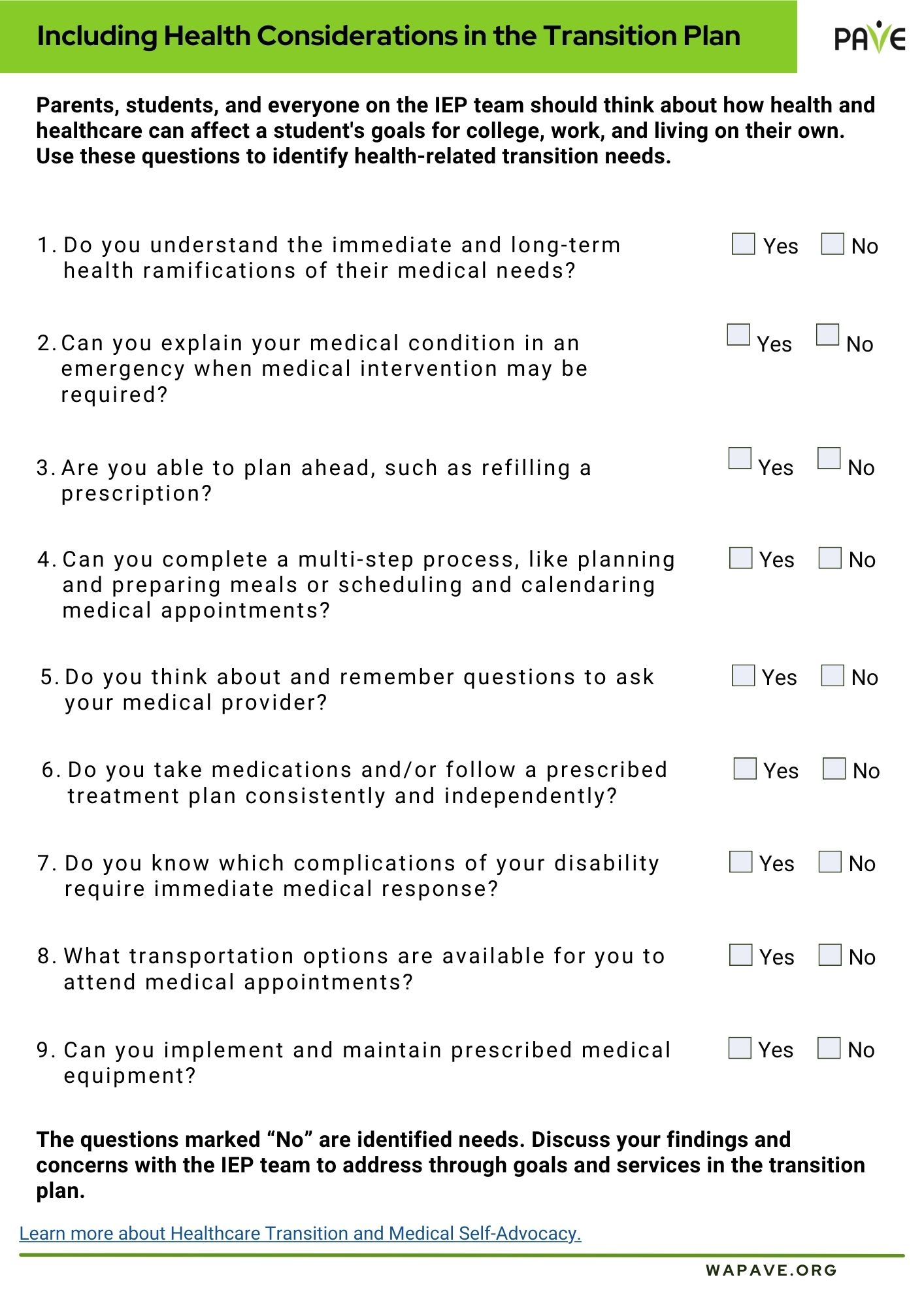
Including Health Considerations in the Transition Plan

Parents, Students, and everyone on the IEP team should think about how health and healthcare can affect a student’s goals for college, work and living on their own. PAVE has made a fillable form that you can download when starting to think about this area in transition.

Including Health Considerations in the Transition Plan

Self-Advocacy: Becoming an Active Member in Your Community

Brief overview:

  • Self-advocacy means taking responsibility for telling others what you need and want in a respectful and direct way. Anyone can be a self-advocate
  • This article will share ways to learn and practice self-advocacy.
  • It will share ways you can get involved in your community and how being a good self-advocate can help you do that.

If you have ever defended your rights or the rights of other people, you were acting as an advocate. Self-advocacy means taking responsibility for telling others what you need and want in a respectful and direct way. Anyone can be a self-advocate. Speaking up for yourself or someone else can help you be independent, and in charge of decisions for your life. However, it’s not always an easy thing to learn to do. It takes time and practice. This article will share ways to learn and practice self-advocacy. It will share ways you can get involved in your community and how being a good self-advocate can help you do that.

When you might need to be a self-advocate:

  • In your IEP meeting if you are in high school
  • When you ask for accommodations in high school or college
  • Asking for accommodations on the job
  • Asking for assistance and accommodations so you can be involved in your community
  • At a medical appointment

Things you need to know to become a better self-advocate:

  • Understand your civil rights and responsibilities
  • Know about the topic you are speaking about
  • Listen to other people and think about what they are saying
  • Make decisions based on what you need or want
  • Know that it’s ok to change your mind
  • Know that it’s ok to make mistakes
  • Express your feelings clearly and calmly
  • Ask to be always treated with dignity and respect
  • Learn to be assertive without being aggressive or disrespectful

Nemours TeensHealth has resources that can help you practice self-advocacy by being assertive. Assertiveness is the ability to speak up for yourself in a way that is honest and respectful. The articles have a built-in listening app (ReadSpeaker) to hear articles instead of reading them.

One way to help meetings and discussions be calm and respectful is to ask for meetings to be a “gracious space”. “Gracious space” is about people meeting together in person or online. It has a lot in common with being a good self-advocate. “Gracious space” is a way to describe how meetings and discussions can include people, and how people can behave during a meeting.

  • If the meeting is in-person, the physical meeting space is accessible for people with all types of disabilities. If it is online, the people setting up the meeting make sure the online platform is accessible for people with all types of disabilities.
  • People feel safe in the meeting. This means everyone treats everyone else with dignity and respect. Make an agreement about how everyone at the meeting will behave with each other.
  • People in the meeting are willing to listen and think about different opinions
  • The people in the meeting get to know each other

Learn more about Gracious Space:

Person Centered Planning:

Your person-centered plan, if you have one, can help you find ways to be involved in your community. Your person-centered plan team can help you practice being a self-advocate with people you already know and trust. If you don’t have a person-centered plan, and are interested in how they work, here are links to information from PAVE: What is Person Centered Planning?

PAVE has programs and resources to help individuals build and strengthen self-advocacy skills.

Ways to get involved in your community, including people with and people without disabilities

  • What are you interested in? Here are some ideas:
  • Work with other people to change government policies and advocate for people with disabilities
  • Volunteer for a cause you believe in
  • Share what life is like living with a disability with other people with your type of disability
  • Careers and businesses that can work well for people with disabilities.
  • Friendship and socializing with other people with disabilities
  • Join a club or group to do activities you like, such as sports or crafts or music or board games or movies

When you join a group or talk with someone in a group you are interested in, you can use your self-advocacy skills to make sure that people in the group or program can give you assistance, accommodations if you need them, and treat you with respect.

You can find groups and organizations that do all these things on social media!

Social media gives you ways to meet people through online groups, if you have difficulty with in-person activities. You can check if a group or organization is disability-friendly in their profile. Remember to use social media safely!

You can also do an internet search using terms like “disability organizations in [name of state or town]. And of course, you can ask your family and friends and, if you have one, the people on your person-centered plan team!

Becoming a strong self-advocate is important for successful independence and healthy living as an adult in your community. Always remember there are many people who are ready and willing to help you, so don’t be afraid to reach out and ask for assistance along the way!

Medicaid Basics

A Brief Overview 

  • Medicaid is state-run health care for those with limited income or individuals with chronic or complex health care needs with special circumstances. 
  • Medicaid is available to many families In Washington state who are not eligible for Medicare and are below certain income levels. 
  • Apple Health for children has broader eligibility requirements, meaning that more children in Washington state can be covered for low or no cost. 
  • You can apply for Medicaid through the Washington Health Plan Finder
     

Full Article 

Medicaid is a federal health care program that each state manages based on their own states legislative system. It is set up for individuals and families with limited income or special circumstances such as a genetic, medical, or job or accident-related disability. This health care covers physical and mental health and can be low to no-cost. To be eligible for fully subsidized (free) Medicaid you must meet the household income eligibility and not be eligible for Medicare. However, Medicaid for those with Medicare can help with some expenses not covered by Medicare for those with low income. It is available for an individual on classic Medicaid whose parent or guardian has died and whose benefits pass to their child. In the state of Washington, Medicaid is generally known as Apple Health and is administered by the Health Care Authority

There are two main types of Medicaid available in the state of Washington: Apple Health (income based), and Classic Medicaid. The day-to-day administration of Apple Health and Classic Medicaid is run by one of five Managed Care Organizations, or MCOs. Apple Health covers individuals up to the age of 6 and eligibility is based on household income. Apple Health has higher income limits for children than adults, meaning that many children in Washington State are eligible for free Apple Health, even when their parents or guardians are not..  If you have Apple Health, you will get healthcare from the providers at one of those MCOs. If you are found (determined) to have a disability or a disabling medical condition and are under the age of 65, you are eligible for Classic Medicaid if you are on Social Security Income or Supplemental Security Income (SSI). This is also considered Apple Health and under one of the 5 MCOs. If an infant, child, or youth through age 21 is in the foster care system they will be covered by Apple Health and will get their healthcare from one specific MCO no matter where they live in the state. 

Determining Eligibility for Apple Health 

Apple Health has different eligibility requirements for children and adults. These differences are listed below, including the maximum monthly household income requirements that families may have to obtain coverage. 

Eligibility for Apple Health for Children: 

  • Children of public employees with access to health insurance coverage under the PEBB or SEBB programs are not eligible for Apple Health for Kids with premiums. 
  • Low-cost coverage (Apple Health with premiums) is only available to children who are uninsured when household income is too high to qualify for free Apple Health (no premiums) 
  • Income requirements for free coverage: (2024) 

Eligibility for Apple Health for Children: 

ServiceSingle Person 2-Person Household 3-Person Household 4-Person Household 5-Person Household 6-Person Household 7-Person Household 
Apple Health for Kids $2613 monthly $3534 monthly $4455 monthly $5375 monthly $6296 monthly $7217 monthly $8138 monthly 

Income requirements for Tier I subsidized coverage ($20 monthly per child; $40 family maximum): 

 ServiceSingle Person 2-Person Household 3-Person Household 4-Person Household 5-Person Household 6-Person Household 7-Person Household 
Apple Health for Kids Tier I $3220 monthly $4355 monthly $5490 monthly $6625 monthly $7761 monthly $8896 monthly $10031 monthly 

Income requirements for Tier II subsidized coverage ($30 monthly per child; $60 family maximum): 

 ServiceSingle Person 2-Person Household 3-Person Household 4-Person Household 5-Person Household 6-Person Household 7-Person Household 
Apple Health for Kids Tier II $3852 monthly $5210 monthly $6568 monthly $7925 monthly $9283 monthly $10641 monthly $11999 monthly 

Eligibility for Apple Health for Adults: 

  • For those aged 19 through 64. 
  • For U.S. citizens or those who meet Medicaid immigration requirements. (Including Washington residents from the Republic of Palau, the Republic of the Marshall Islands, and the Federated States of Micronesia) 
  • For those who are not entitled to Medicare.  
  • Have annual household income at or below the Medicaid standard: 

Eligibility for Apple Health for Adults: 

 ServiceSingle Person 2-Person Household 3-Person Household 4-Person Household 5-Person Household 6-Person Household 7-Person Household 
Apple Health for Adults $1677 monthly $2268 monthly $2868 monthly $3450 monthly $4042 monthly $4633 monthly $5224 monthly 

How to Apply 

There are a couple of ways to start the process of getting Medicaid or other subsidized health care plans. The Health Insurance Marketplace Calculator provides estimates of health insurance premiums and subsidies for people purchasing insurance on their own in health insurance exchanges or “Marketplaces.” The Washington Health Benefit Exchange can help families and individuals find subsidized health care in their area.  

When ready to apply for coverage from Apple Health: 

  1. Review adult and/or child income eligibility requirements.
  2. Read the Eligibility Overview to determine if Apple Health is the best fit for you and your family. 
  3. Create an account on Washington Health Plan Finder
  4. Collect and enter information into the Washington Health Plan Finder application, WAPlanfinder Mobile App, downloadable paper form, or call the Washington Healthplanfinder Customer Support Center at 1-855-923-4633. 
  5. Review the five Integrated Health Care Plans responsible for Medicaid in Washington, not all of which may be available in your location. 
  6. If you need further help, contact a free Health Plan Navigator

To get signed up with Medicaid Classic, go online to WashingtonConnection and select “Apply Now,” or call 1-877-501-2233. For additional help signing up for Medicaid in Washington, help is available from Parent help 123, which can be contacted at 1-800-322-2588, or PAVE. If, in looking at the information above, you feel that you or the person you care for has lost Medicaid through a mistake or a problem with the system and going through the Washington Connection is not resolving the issue, the Federal Government is asking that you go through Healthcare.gov to get help with re-enrollment.  

Step-By-Step Guide to Requesting Accommodations on SAT and ACT Exams

The transition from high school to college can be a daunting experience for any teenager. Part of the transition process is preparing for and taking the entrance exams for college. If the student is receiving accommodations in school, they may qualify to receive special accommodations while taking a college entrance exam.

The ACT and College Board Services for Students with Disabilities (SSD) do not approve accommodations for all college entrance exams. Contact your school, college, or testing center for the CLEP and ACCUPLACER tests. Students with documented disabilities may request accommodations on PSAT-related assessments with the help of their school counselor.

Differences Between SAT and ACT Exams

Most universities accept both SAT and ACT and the length of both tests is approximately the same.  ACT has more questions in that same period, so fast workers may prefer it.  However, the best one for a student is the one they feel best about, so trying sections of both before choosing which one to study for is recommended by most test prep professionals. Both ACT and SAT have free practice sections available.

SATACT
Reading (65 min, 52 Questions)Reading (35 min, 35 Questions)
Writing (35 min, 44 Questions)English (45 min, 75 Questions)
Math (80 min, 58 Questions)Math (60 min, 60 Questions)
Optional essay (50 min)Science (35 min, 40 Questions)
Scored 400-1600Optional essay (30 min)
Scored 1-36

A student must have approval from the College Board SSD (for the SAT) or ACT to use accommodations on an exam. If a student uses extended test time or other accommodations without prior approval, their test results will be invalid.

The process of requesting accommodations varies depending on the exam. These are the steps to request accommodations on SAT and ACT college entrance exams:

Step 1: Document the need for accommodations.

The student must have a documented disability. Documentation can be a current psycho-educational evaluation or a report from a doctor. The type of documentation depends on the student’s circumstances. The disability must impact the student’s ability to participate in the college entrance exams. If the student is requesting a specific accommodation, documentation should demonstrate the difficulty the student has performing the related task. The College Board provides a disability documentation guideline and accommodation documentation guideline, as does the ACT. Doctor notes and Individualized Education Program (IEPs) or 504 plans may not be enough to validate a request for accommodations; you must provide supporting information, such as test scores. 

While students typically only receive accommodations if they have a documented disability, some (very few) students who have a temporary disability or special healthcare need can also be eligible. The request is different in these circumstances for those who wish to take the SAT exam and students are often urged to reregister for a date after they have healed. If the student cannot postpone their test, the request form for temporary assistance must be completed by a school official, student (if over 18) or parent, doctor, and teacher. Then, the form must be faxed or mailed to the College Board for processing.

Step 2: Allow plenty of time for processing.

It takes time to apply for accommodations, including a processing period of up to seven weeks after all required documentation has been submitted to the College Board SSD or ACT. If they request additional documentation, or if a request is resubmitted, approval can take an additional seven weeks. Start as early as possible before the exam date to allow enough time for processing, responding to a request for more documentation, and additional processing time. If the student will take the exam in the fall, they should begin the process in the spring to allow sufficient time for processing.

Step 3: Identify appropriate accommodations.

If the student has a formal education plan, review the current plan, and note accommodations listed throughout, especially (but not only) those the student uses during assessments. Read through recent medical evaluations, prescriptions, and records to ensure all accommodations have been included in the formal education plan, if the student has one, or to locate appropriate accommodations recommended by medical professionals. You may recognize some of the Possible Accommodations for SAT and ACT Entrance Exams.

Some accommodations may only be provided during certain sections of the exam, depending on the specific accommodation requested. For example, a student with dyscalculia may receive extended time during the math section of the exam but not for any other subject.

Step 4: Submit the request for accommodations.

The easiest way to request SAT accommodations is to go through your student’s school. If you choose to go through the school, the school’s Services for Students with Disabilities (SSD) Coordinator (Special Education Coordinator, Guidance/School Counselors, etc.) can go online to review the SAT Suite Accommodations and Supports Verification Checklist and submit the application. Having the coordinator submit the application will help streamline the process. Homeschooled students or those who choose not to go through the school may request accommodations on the SAT exam by printing the Student Eligibility Form and submitting all documentation by fax or postal mail.

Requesting accommodations for the ACT exam requires working with a school official who is a part of the IEP team. The accommodations requested should be similar to the accommodations currently being received in school and must be approved by ACT before the test. All requests, including appeals, must be submitted by the late registration deadline for the preferred test date. Homeschooled students may request accommodations on the ACT exam by creating an ACT account online and submitting the required documents electronically.

Step 5: Register for the college exam.

Once the student is approved for SAT accommodations, they will receive a Service for Students with Disability (SSD) number that must be included when registering for the test. The school’s SSD Coordinator should ensure all the correct accommodations are in place when it is time to take the college exam. Approved accommodations will remain in effect for one year after graduation from high school.

Additional Information